Tricked by Assumptions
•
Who’s Line is it Anyway?
I spend a lot of my time moving back and forth between Windows and Linux so I really feel like I should have caught this sooner … but I didn’t, so to make amends, I’m going to write about it because it drove me to re-evaluate my base assumptions about how things work, something I try to always remember to do in the reverse engineering world. So buckle up … this is probalby going to be more technical than most people care about and probably longer than most want to read.
Here’s the code in question (well, a simplified version of it):
#!/usr/bin/env python3

import sys

name = sys.argv[1]
with open(name, 'w+') as f:
    # TODO: a bunch of magic happens here instead...
    for i in range(100):
        wrong_chksum = (0xFF - (i & 0xFF))
        line = f"S309{i:08X}{i:08X}{wrong_chksum:02X}"
        f.write(line)
        f.write("\n")
And then …
# sure buddy
python3 dump.py run1

# in the first iteration of the script, i just printed out and used the redirector
# what could go wrong?
cat run1 > full_memory.srec
Now this is overly simplified, just because I want something easy to discuss … but, it’s not hard to imagine a world in which i is really a small memory read of an address and value such as Heartbleed, and you’re going to take that information and turn it into something more complex like an srec file so you can go exploring in your reverse engineering tool of choice.
“But Wyatt - why would you use an old Motorola S-Record format? What are you so old???” - and that’s a great question.
One of the reasons I like S-Record is because it’s declarative on where exactly memory goes and when you combine that with awesome tools like ImHex, you get the nice “blank” spaces of memory filled in for you, like 0x0 --> <your start address>
This naturally makes it easier when you load a flat binary into Ghidra and then go about doing whatever reverse engineers do (probably complaining).
So anyway, this was where I was, converting bytes back into an srec format and when I run srec_info and find that my file is invalid.
What the crap??? Why would it be invalid, it’s a simple format, it should have been easy … but it wasn’t. I messed up the checksum because I forgot the ~.
No biggie, I’ll fix that simple change for the checksum, rerun and I’ll be off on my way…. and I was so wrong. (if you’ve spotted my error already - congrats, you’ve clearly exprienced a sad time too, call me for drinks).
Natrually, I do the work, I generate my S-Record file and then I load it … and ImHex says there no data.
Then I go to Ghidra … no compatible loader other than raw
Go back to the srec_info - ` 1: warning: ignoring garbage`
That’s so weird right? We’ll just assume that I had no other problems with my code (ok, there was like 2 but none of them were this). So … let’s open run1:
PS C:\Users\wyatt\OneDrive\Documents\test> cat run1
S3090000000000000000FF
S3090000000100000001FE
S3090000000200000002FD
...
… looks fine. (find the error yet?)
Open it in notepad.exe … looks fine there as well? What the heck is going on? No matter how many times I do it, run1 and run2 and run3 are the same in this experiment, so why am I still getting issues?
# see it yet?
PS C:\Users\wyatt\OneDrive\Documents\test> cat run1 > full_memory.srec
And notepad?
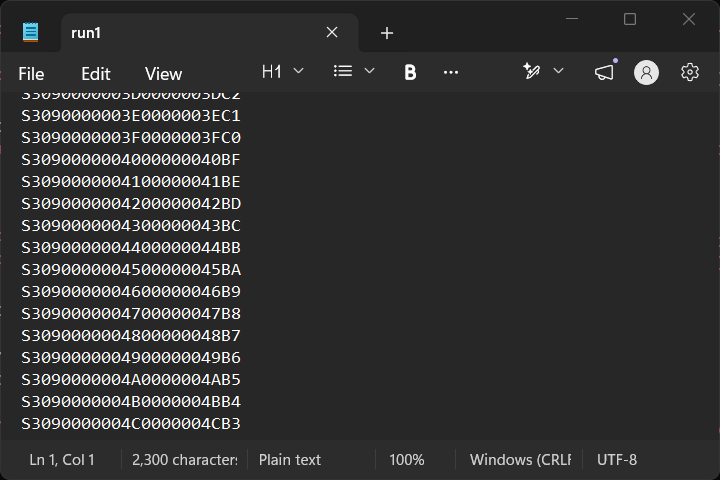 That looks right to me, right???
FINE … what’s the srec look like?
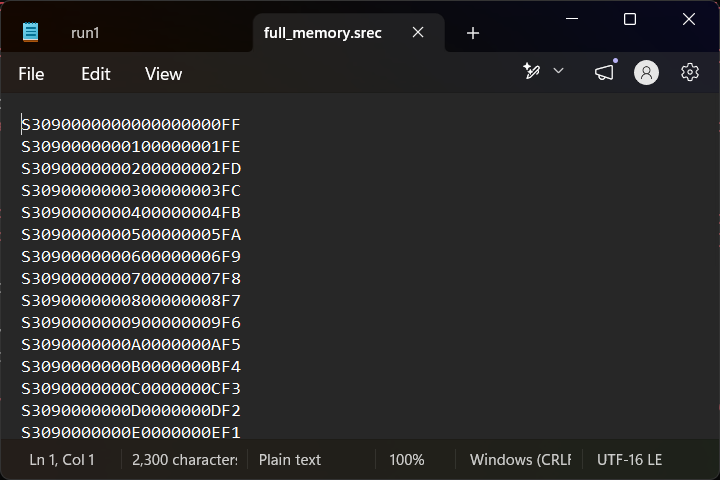
That also looks fine … right? It’s the same data, everything has to clearly be the same! I know … I’ll PROVE they’re the same with some md5sum action:
wyatt@lazarus ~ $ md5sum run1 full_memory.srec
f04a641c944185aaa75bdd47f5f67765  run1
f99f16a110b6de000333c5143157e376  full_memory.srec
No… that can’t be…
wyatt@lazarus ~ $ cat run1 > run1.i.am.sane
wyatt@lazarus ~ $ cat full_memory.srec > full_memory.srec.i.am.sane
wyatt@lazarus ~ $ md5sum run1* full_memory.srec*
f04a641c944185aaa75bdd47f5f67765  run1
f04a641c944185aaa75bdd47f5f67765  run1.i.am.sane
f99f16a110b6de000333c5143157e376  full_memory.srec
f99f16a110b6de000333c5143157e376  full_memory.srec.i.am.sane

And then I get to the part where I remember … Windows is utf-16 and not ascii or utf-8.
So what? So why does this matter???
Because I was using the S-record format … and utf-16 is not ascii … it’s no where close:
wyatt@lazarus ~ $ hexdump -Cv run1 | head -n2
00000000  53 33 30 39 30 30 30 30  30 30 30 30 30 30 30 30  |S309000000000000|
00000010  30 30 30 30 46 46 0d 0a  53 33 30 39 30 30 30 30  |0000FF..S3090000|
wyatt@lazarus ~ $ hexdump -Cv full_memory.srec | head -n2
00000000  ff fe 53 00 33 00 30 00  39 00 30 00 30 00 30 00  |..S.3.0.9.0.0.0.|
00000010  30 00 30 00 30 00 30 00  30 00 30 00 30 00 30 00  |0.0.0.0.0.0.0.0.|
So even though I was correctly outputting the file (well, at least closer since utf-8 is also not exactly ascii, but close enough for all I was using) … I hosed myself with the cat command in powershell, which outputs in utf-16 and then the > happily redirects that to a new, completely incorrect file.
Or was it….
import sys

a = "i'm not crazy, my mother had me tested"
# clearly this should outupt ascii because it's 'ascii'
sys.stdout.write(a.encode('ascii').decode('ascii'))
And then…
PS C:\Users\wyatt\OneDrive\Documents\test> python3 .\test2.py
i'm not crazy, my mother had me tested
PS C:\Users\wyatt\OneDrive\Documents\test> python3 .\test2.py > insane.txt
PS C:\Users\wyatt\OneDrive\Documents\test> notepad .\insane.txt
Moment of truth and it’s utf-16 again…
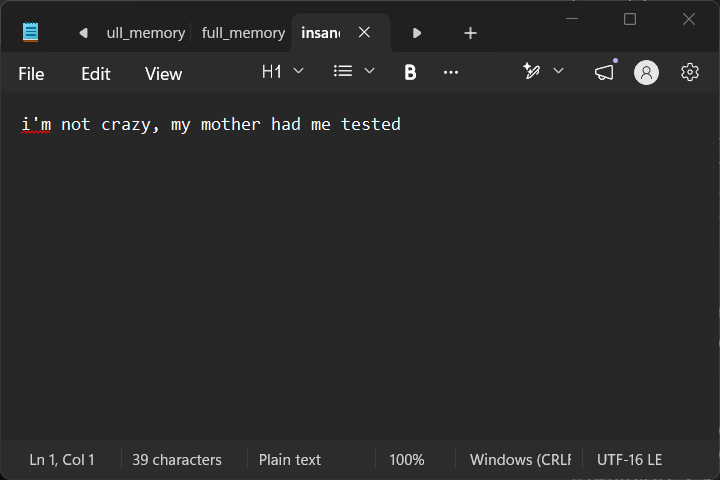
Yep. That’s great. Even if I write out ascii to the terminal the > operator will ensure compliance with Windows utf-16 encodings.
If you made it this far, I’m sorry, but I appreciate you sticking with me to understand the solution was to just write the file out and avoid the > operator and do the cat over on the Linux system where we don’t have to worry about it changing our data.
Incidentally, this isn’t the first time this has happened before.